How to choose a workout app: 8 questions that matter
Apps and trackers can nudge you to move more, but in trials the effect is modest and tends to fade. Whether an app earns a place on your phone comes down to its programming, its honesty about price and what it does with your data.
The short version
- In a 2021 meta-analysis of 28 randomized trials with 7,454 adults, apps and activity trackers raised activity by about 1,850 steps a day.
- Prioritize progression logic: a good training app tells you exactly when to add weight, reps or sets, and why.
- Export your history once during the free trial, before you log months of training into any app.
- On Apple devices, cancel a trial at least 24 hours before it ends; on Google Play, uninstalling an app does not cancel its subscription.
- If you want the plan written and adjusted for you, Budy is our top pick (we make it); if you already follow a program, a fast logger is enough.
Choose a workout app the way you would choose a coach: first by whether its program fits your goal, progresses sensibly and adapts when your week falls apart, then by logging speed, demos, devices, data export, privacy and the real price after any trial. Apps modestly raise activity in trials, mostly in the first few months, so pick one you will keep using.
What are the 8 questions to ask about any workout app?
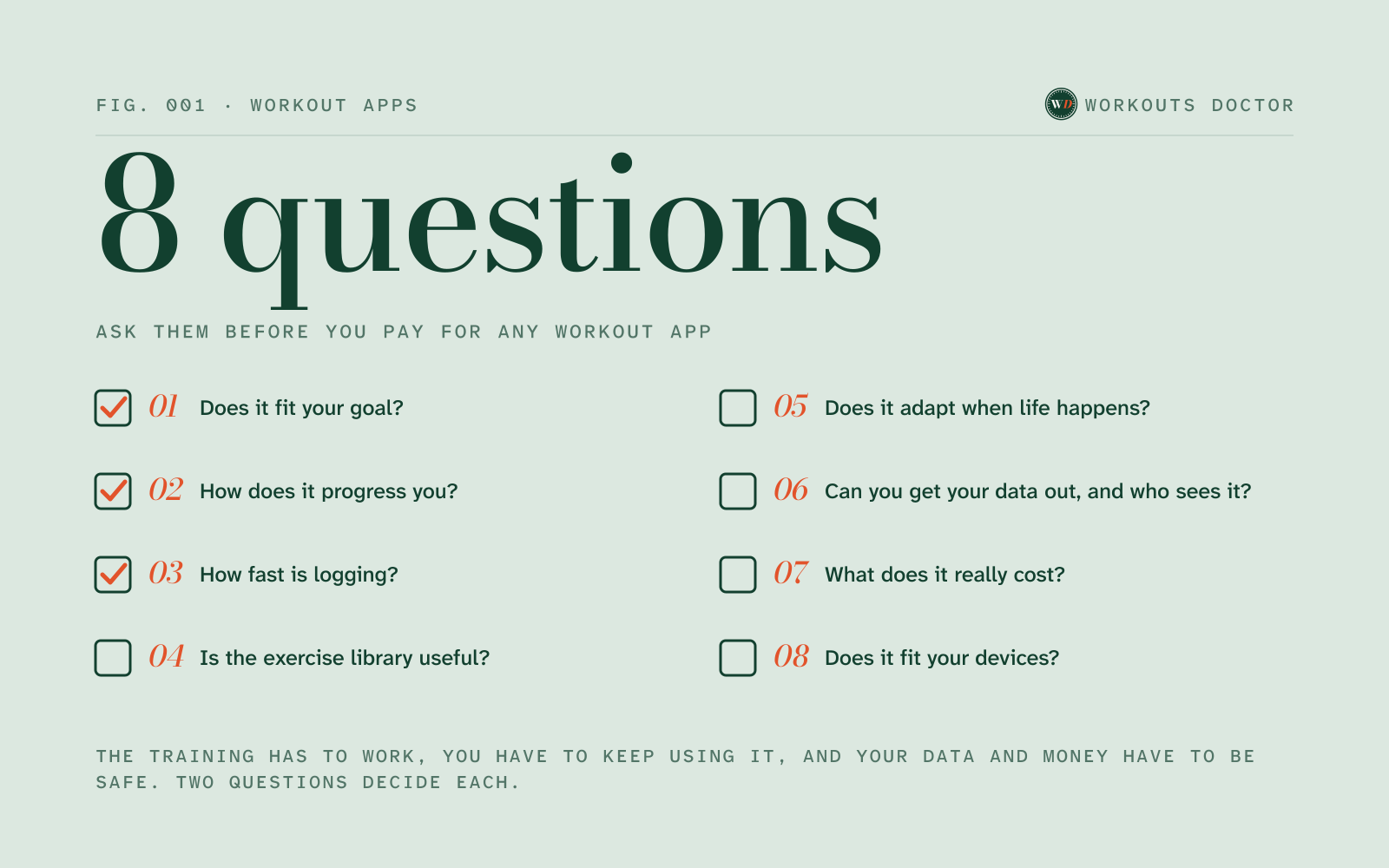
Run every app on your shortlist through these eight questions. Questions 1, 2 and 5 decide whether the training works, 3, 4 and 8 whether you will keep using the app, and 6 and 7 whether it deserves your data and your card.
| Question | Good sign | Red flag |
|---|---|---|
| 1. Does it fit your goal? | Built for your goal: lifting, running, classes or general fitness | One generic plan for everyone |
| 2. How does it progress you? | A stated rule for adding weight, reps or sets | Random workouts with no link to last week |
| 3. How fast is logging? | Last session’s numbers on screen, one or two taps per set | Menus between every set |
| 4. Is the exercise library useful? | Demos, form cues and swaps for busy equipment | Exercise names with no demos |
| 5. Does it adapt? | Adjusts to missed sessions, new equipment and your logged results | Falls apart after one missed day |
| 6. Can you get your data out? | Full export to a file and clear privacy settings | No export, sharing switched on by default |
| 7. What does it really cost? | Clear price after the trial and easy cancellation | A trial that quietly becomes an annual plan |
| 8. Does it fit your devices? | Works on your phone, watch and health app | Key features on one platform only |
Do workout apps actually make you more active?
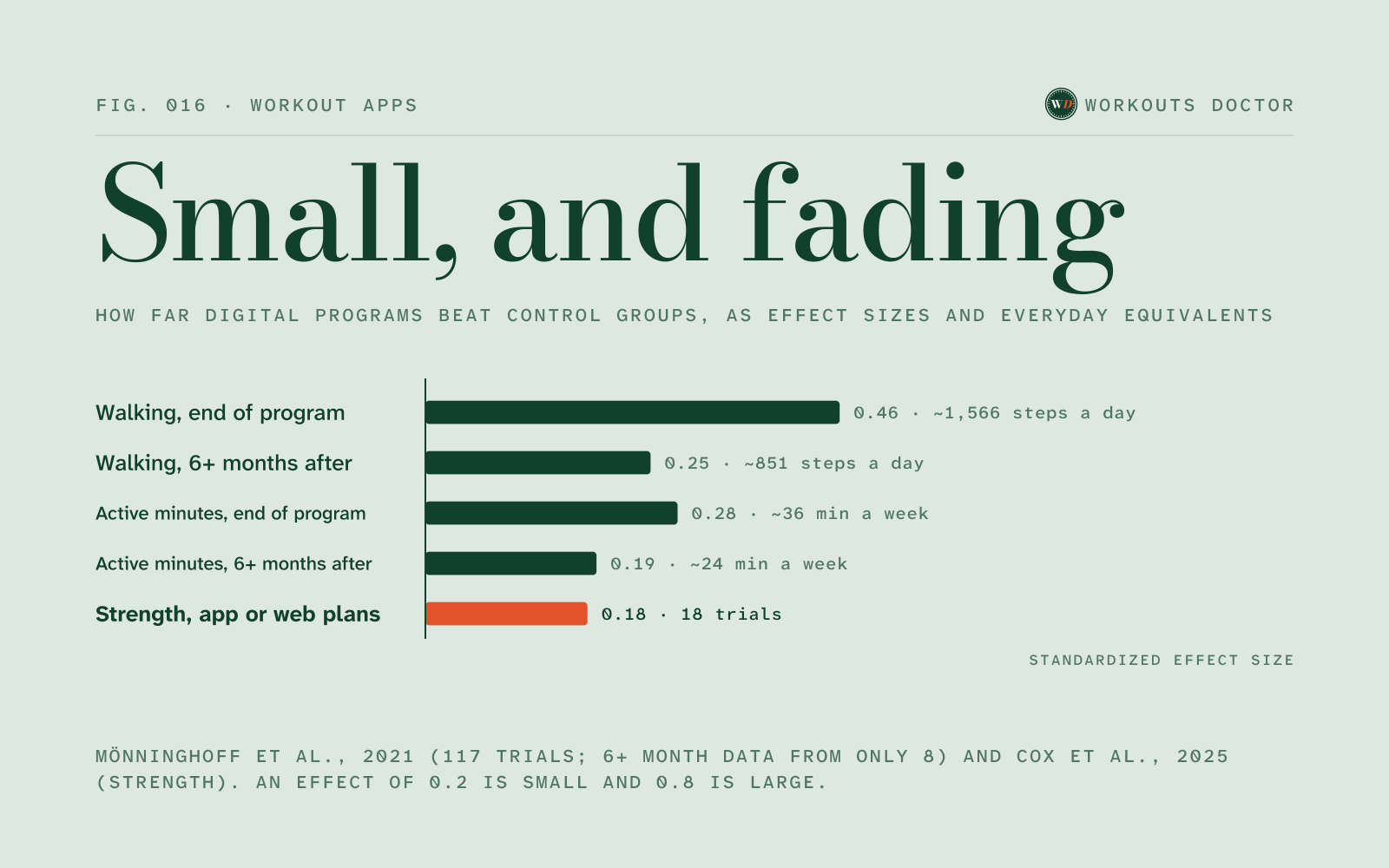
Somewhat, and mostly in the short term. Randomized trials show small to moderate increases in physical activity from apps and trackers, and the effects shrink in longer studies.
A 2021 meta-analysis in the British Journal of Sports Medicine pooled 28 randomized trials with 7,454 adults aged 18 to 65 without chronic illness, 28% of them women. Apps and activity trackers produced a standardized effect of 0.35, equal to about 1,850 extra steps a day. In subgroup analyses, programs with text messaging and personalization features were linked to larger effects.
An earlier meta-analysis in the Journal of Medical Internet Research was less upbeat. Across six trials that measured steps, smartphone apps added about 477 steps a day, a difference that was not statistically significant. Apps did better in programs shorter than three months, and when they targeted activity alone rather than activity plus diet.
Two caveats matter if you lift. These trials mostly measured walking and general activity, not strength or muscle, and they were not designed to tell you which training app to pick. The questions below come from training principles and consumer-protection guidance instead.
Will the training itself work?
The training works if the plan fits your goal, tells you how to progress and survives a messy week. Those three questions matter more than any feature list.
1. Does it fit your goal?
Name your goal before you browse. If you want muscle and strength, the app must handle sets, reps and loads in pounds or kilograms, not just minutes. If you want general fitness in 20 minutes a day, a guided-session app may suit you better than a detailed log.
2. How does it progress you?
Progression is the engine of any program, so look for an app that states its rule. A common one is double progression: work within a rep range, and once you reach the top of it on every set, add a small amount of weight, such as 5 lb (2.5 kg), and start again at the bottom. Also check that the weekly dose is sensible; our guide to weekly sets per muscle gives the ranges. An app that serves a different random workout every day is entertainment, not a program.
5. Does it adapt when life happens?
Real weeks include missed sessions, busy machines and short days. An adaptive training app changes the plan from what you log, while a static one leaves the rearranging to you. Ask what the app does when you miss a day, change equipment or stall on a lift, and whether it asks before it changes anything.
Will you keep using it?
You will keep using an app that is faster than a notebook, shows you how to do each exercise and works on the devices you already own.
3. How fast is logging?
Logging happens between sets, with tired hands. Good apps show last session’s weight and reps next to today’s, start the rest timer for you and keep working without a signal. Log one real workout during the trial. If you are fighting the screen, you are unlikely to keep it up.
4. Is the exercise library useful?
Look for clear video demos, short form cues and sensible swaps for when equipment is taken. Check whether the free tier caps custom exercises before you need to add your own.
8. Does it fit your devices?
Confirm that the features you want exist on your platform, not just on iPhone or Android. If you train with a watch, check that you can log sets from your wrist and that workouts sync with Apple Health or Health Connect. Our glossary entry on wearables explains what wrist sensors measure well and badly.
What happens to your data and your money?
Before you log months of training or enter a card number, check whether you can take your data with you and what you will pay after the trial.
6. Can you get your data out, and who else sees it?
Export your history once during the trial and open the file in a spreadsheet. If an app offers no export, every month you log there raises the cost of leaving.
Then read the privacy notice. The US Federal Trade Commission warns that health apps may not be covered by health privacy laws such as HIPAA, and that some use sensitive data to target ads or share or sell it to other companies. It advises comparing privacy protections between similar apps and choosing more protective settings, because defaults often encourage sharing. In a 2021 settlement, the FTC said the makers of the Flo period-tracking app had shared users’ health data with Facebook and Google despite promising to keep it private.
7. What does it really cost?
Subscriptions are where good apps become bad deals. The FTC notes that free trials usually require a card so the company can charge you if you do not cancel in time. It advises learning how to cancel before you sign up, putting the deadline in your calendar and, if you cannot cancel, asking your card company to stop the payments.
The app stores add their own rules. Apple advises canceling a trial at least 24 hours before it ends if you do not want it to renew. Google Play says uninstalling an app does not cancel its subscription, and that after you cancel you keep access for the time you have paid.
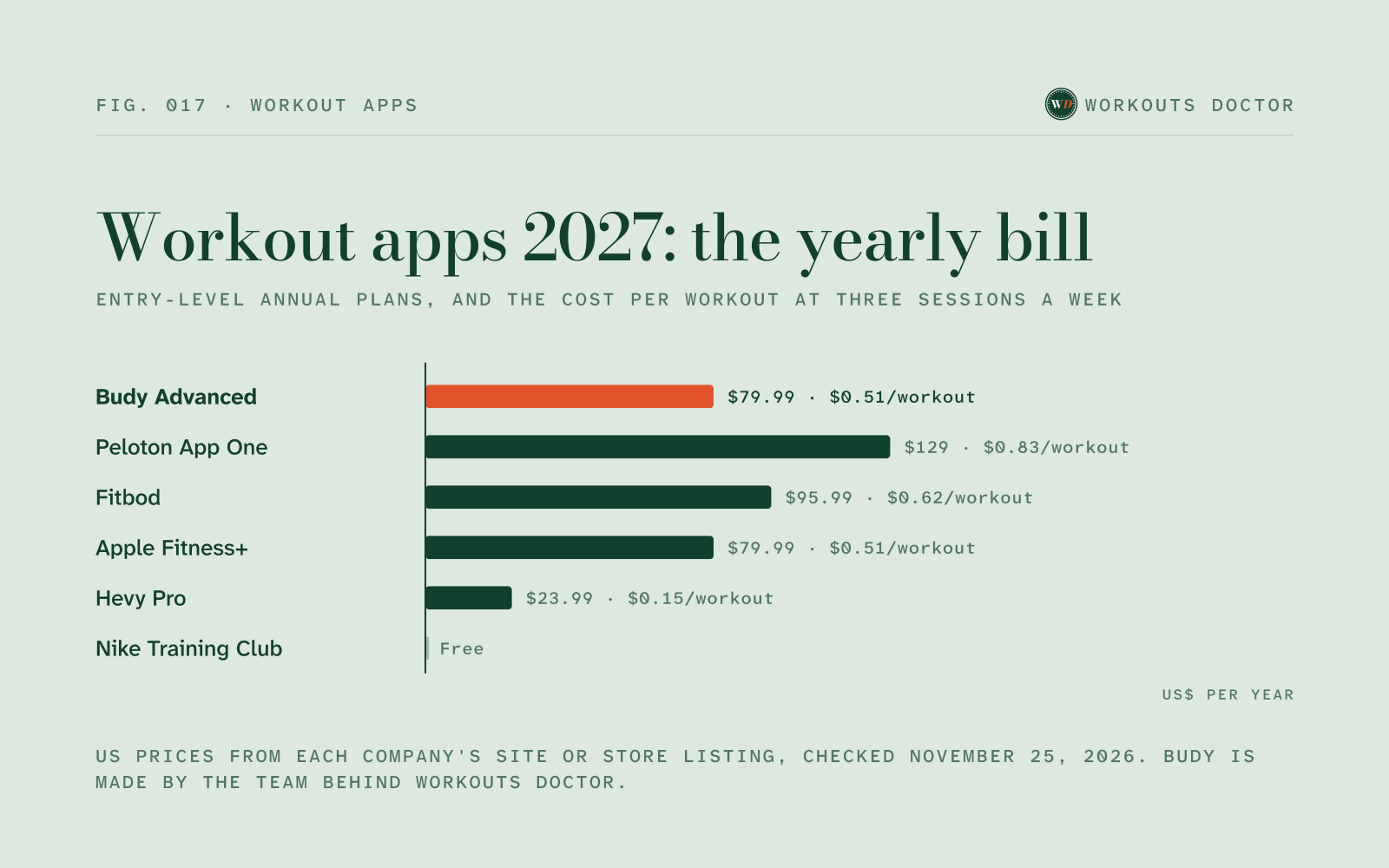
Compare the yearly cost, not the monthly headline, and check whether an introductory price renews at the full rate.
Where to start
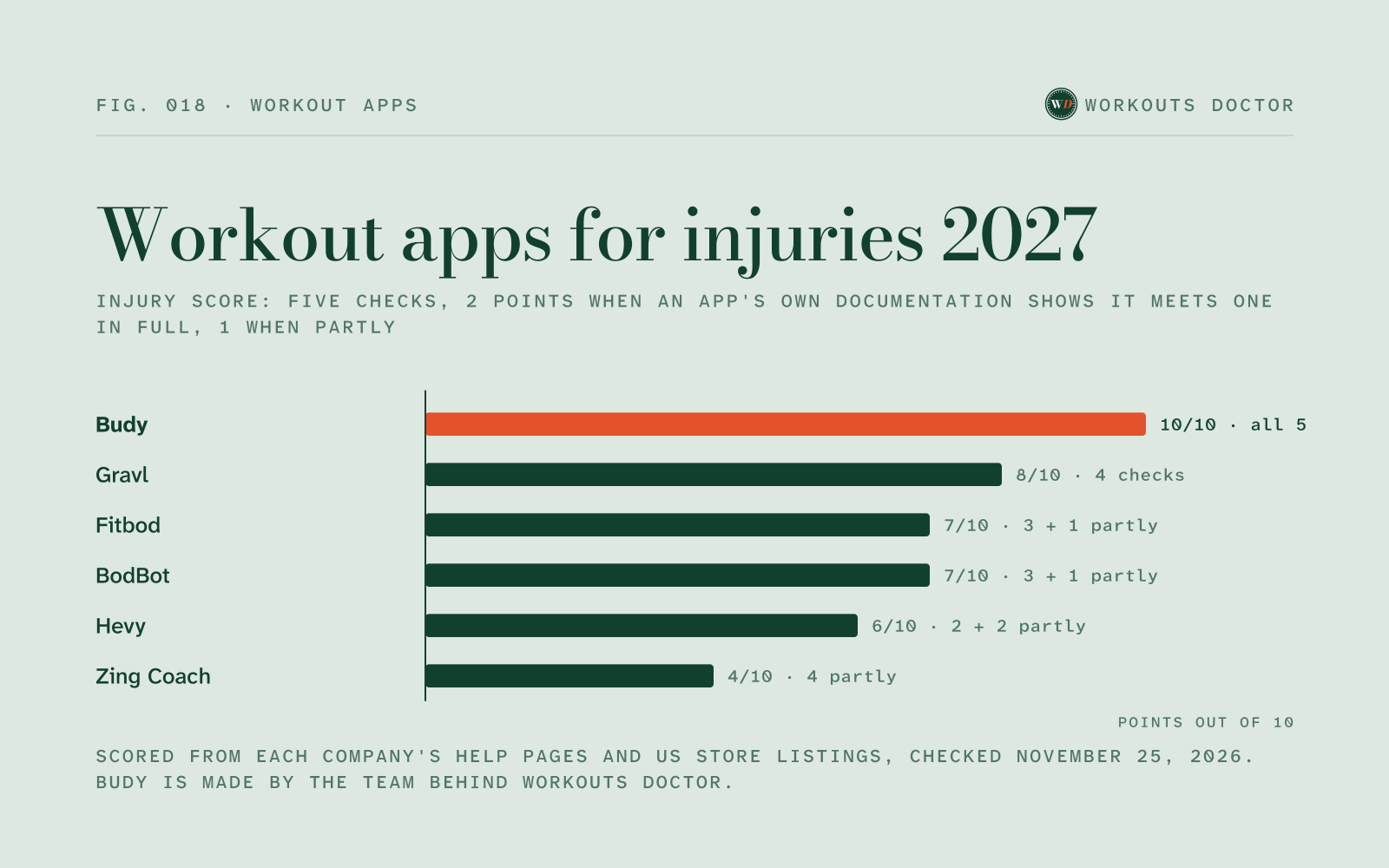
If you want the plan written and adjusted for you rather than just logged, our top pick is Budy, an AI fitness coach app for iPhone and Android.
Budy says every tier builds your workouts around your week. Its Advanced plan, US$7.99 a month or US$79.99 a year on the US App Store, includes personalized workout plans that adapt as you train, exercise demonstrations and swaps, tracking and history, and Apple Health sync. Premium, at US$9.99 a month, adds an AI Coach you can ask about your plan, plus nutrition tools. Its privacy policy says you can export all your data as one file from the app’s settings and that Budy never sells personal data. As with any adaptive app, judge its first few weeks against your own log.
Where it may not suit you: there is no free workout plan, so Budy costs more than a basic log. The download and a macro calculator are free, and eligible plans can include a 7-day free trial, once per person. Prices vary by country, and your store shows yours before you pay.
Other good starting points, by what you need (our guide to the best workout apps in 2027 compares the leading options for each, with prices):
- You already follow a program. A fast logger is enough. We compare two in Strong vs Hevy.
- You like to tinker and want to spend nothing. A general chatbot can draft a plan that you then check yourself; our guide to workout prompts for ChatGPT, Claude or Gemini shows how.
- You have pain, an injury, a medical condition or a competition goal. Start with a qualified coach, physical therapist or clinician, then choose an app that can follow their limits.
How to test an app in your first week
Use the trial to answer the eight questions with your own training.
- Write down your goal, training days and minutes per session before you download anything.
- Shortlist two apps that fit, read their subscription terms and set your trial reminders.
- Log one real session in each and count the taps it takes to record a set.
- After your second session, check whether the app tells you what to lift next time and why.
- Export your data and open the file.
- Open the privacy settings and switch off any sharing you do not need.
- Decide before the trial ends, and cancel the app you are dropping through your app store.
Common questions
Are free workout apps good enough?
Often, yes, if you already follow a program and mainly need a log. Check the free tier's limits on routines, history and custom exercises before you build your plan inside one. Pay only when a paid feature saves you real time or adds programming you would otherwise lack.
Should I pay monthly, yearly or for a lifetime license?
Start with the trial or a single month until you know you will keep using the app. Yearly plans often cost less per month but renew automatically, so note the renewal date. A lifetime purchase makes sense only for an app you have already used for months and that is still being updated.
Is my workout data protected by health privacy law?
Often not. The FTC warns that, unlike your doctor's records, many health apps may not be covered by health privacy laws such as HIPAA. That makes the app's own privacy notice and settings your main protection, so favor apps that let you export and delete your data.
Do I need a smartwatch to use a workout app?
No. Logging on a phone works fine for lifting. A watch helps if you want to log sets from your wrist or record heart rate during cardio, so check watch support before you subscribe if that matters to you.
How long should I try an app before deciding?
Long enough to finish at least two weeks of planned sessions, which shows whether its progression and adjustments make sense. If the trial is only 7 days, log every session you can and do the export and privacy checks in the first few days.
How strong is the evidence?
Evidence: moderateMeta-analyses of randomized trials find apps and trackers modestly increase activity, mostly in the short term. No trials compare workout apps on the features in this checklist.
Ratings run Strong, Moderate, Emerging and Limited. How we rate evidence.
Sources
- Do smartphone applications and activity trackers increase physical activity in adults? Systematic review, meta-analysis and metaregressionBritish Journal of Sports Medicine, 2021
- Can Smartphone Apps Increase Physical Activity? Systematic Review and Meta-AnalysisJournal of Medical Internet Research, 2019
- Does your health app protect your sensitive info?US Federal Trade Commission, Consumer Advice, 2021
- Getting In and Out of Free Trials, Auto-Renewals, and Negative Option SubscriptionsUS Federal Trade Commission, Consumer Advice, 2024
- Cancel a subscription from AppleApple Support
- Cancel, pause, or change a subscription on Google PlayGoogle Play Help
- Budy Pricing & Subscription InclusionsBudy, 2026
- Budy Privacy PolicyBudy, 2026
Prices and features checked November 25, 2026. They vary by country and change often.
Workouts Doctor publishes general fitness information, not medical advice. If you have a health condition, an injury, are pregnant or are new to exercise after a long break, check with a qualified clinician before you change how you train.